A secure email gateway sits between the internet and your mail server to block spam, malware, and phishing. It inspects headers, attachments, and links. It reduces risk but does not stop targeted attacks that use legitimate language or bypass standard authentication protocols.
What exactly is a secure email gateway?
A secure email gateway is a network appliance or cloud service that sits between external mail servers and your internal organization. It intercepts all incoming and outgoing email traffic to scan for threats before delivery. Think of it as a bouncer that checks IDs and searches bags before letting guests into a club. It operates at the transport layer, meaning it sees the raw data stream before your email client renders it.
How does it differ from standard spam filters?
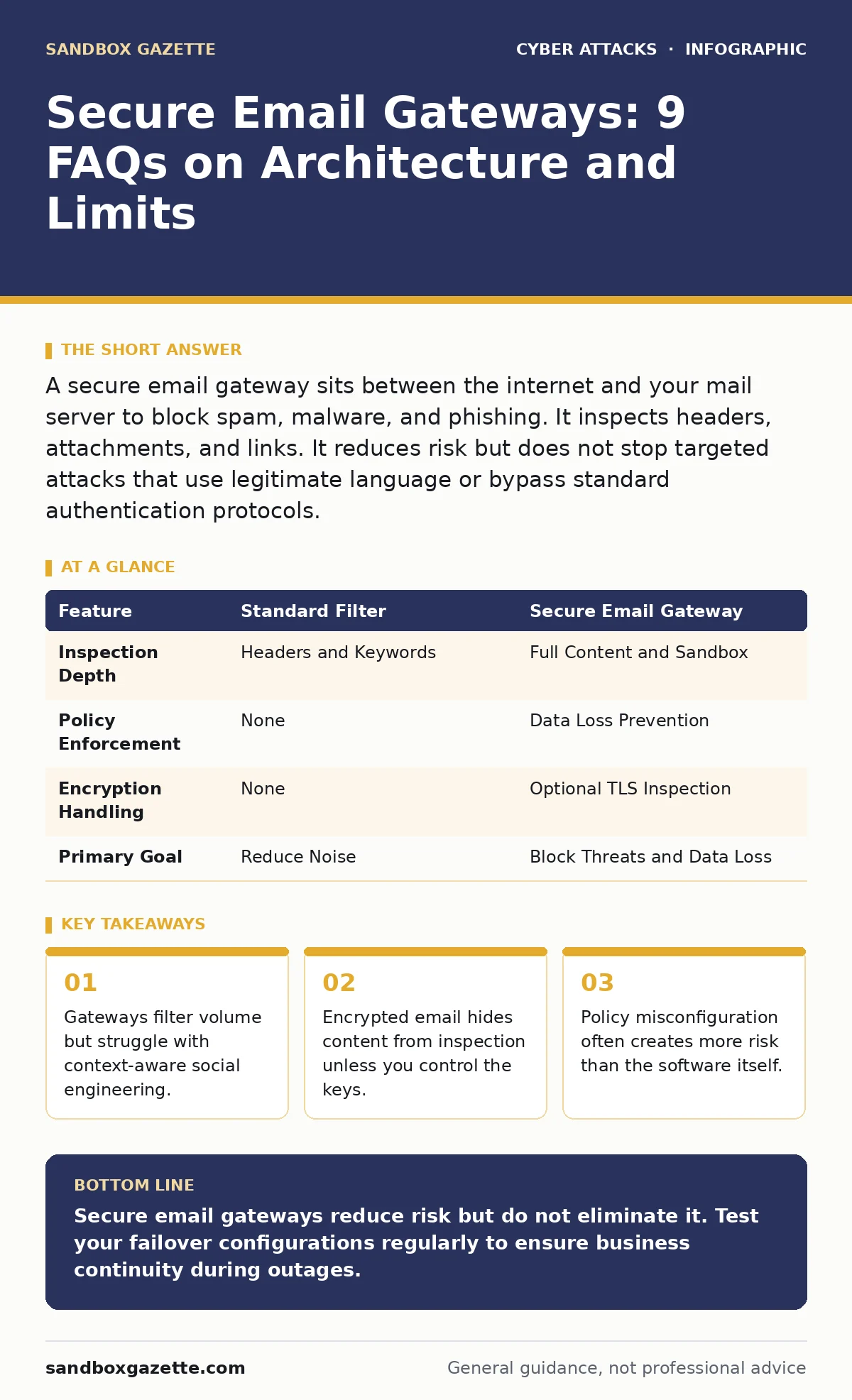
Standard spam filters rely heavily on reputation lists and basic keyword matching to mark low-priority messages. A secure email gateway performs deep content inspection, including sandboxing attachments and analyzing URL destinations. It also enforces organizational policies, such as blocking sensitive data from leaving the company. Standard filters are reactive; gateways are proactive and policy-driven.
Can it stop zero-day malware?
It can detect many zero-day threats by using behavioral analysis rather than signature matching. Behavioral analysis watches what a file does in a isolated environment, or sandbox, rather than checking if it looks like known bad software. However, it cannot catch every novel exploit, especially those that target specific application vulnerabilities. No system provides absolute protection against unknown code execution paths.
Does it protect against phishing attacks?
It blocks many phishing attempts by checking domain authentication and known malicious URLs. It verifies that the sender is who they claim to be using protocols like DKIM. DKIM adds a digital signature to emails, allowing the receiver to verify the message was not altered in transit. However, it cannot read the human intent behind a message that uses correct grammar and a legitimate-looking domain.
How does it handle encrypted emails?
Standard gateways cannot inspect the content of emails encrypted with end-to-end encryption. End-to-end encryption means only the sender and receiver hold the keys to decrypt the message. If the gateway does not have the private key, it sees only scrambled data. Organizations that require deep inspection must implement key management systems to decrypt traffic at the gateway, then re-encrypt it. This creates a single point of failure where keys are exposed.
See also: Email Encryption Best Practices for Secure Data Exchange · DKIM Email Security: Real Benefits and Hidden Limitations
What is the performance impact on mail delivery?
Processing every message adds latency to delivery times. The gateway must scan headers, bodies, and attachments, which takes processing power. High-volume organizations may see delays of several seconds per message. If the gateway fails or becomes unresponsive, email flow stops entirely unless you configure bypass rules. Bypass rules allow traffic to pass without inspection during outages, which increases risk.
Can it prevent data exfiltration?
It can block outbound emails containing patterns that match sensitive data formats. These patterns include credit card numbers, social security numbers, or proprietary code snippets. This feature is known as data loss prevention. It works by scanning outbound content against defined rules. However, attackers can bypass this by using steganography, hiding data inside image files, or splitting data across multiple messages.
Why do some threats still get through?
Advanced persistent threats often use legitimate business communication channels to avoid detection. Attackers may rent legitimate email accounts to send messages that look normal. The gateway sees a valid sender, a clean attachment, and a benign link. The threat lies in the context, not the content. This is why secure email gateways are often paired with zero trust security principles that verify every access request.
| Feature | Standard Filter | Secure Email Gateway |
|---|---|---|
| Inspection Depth | Headers and Keywords | Full Content and Sandbox |
| Policy Enforcement | None | Data Loss Prevention |
| Encryption Handling | None | Optional TLS Inspection |
| Primary Goal | Reduce Noise | Block Threats and Data Loss |
How do I configure it without breaking workflows?
Start with strict inbound rules and lenient outbound rules. Tight inbound filtering stops most threats before they enter. Lenient outbound filtering prevents blocking legitimate business communications that might trigger false positives. Monitor logs closely for the first few weeks to adjust thresholds. Over-tightening rules often leads users to bypass security by using personal email accounts. This behavior is a common trigger for account takeover attempts.
What happens if the gateway goes offline?
If the gateway is a single point of failure, your email service stops. You must configure failover mechanisms to route traffic directly to your mail server during outages. This direct routing bypasses all security checks. You accept the risk of receiving spam and malware to maintain communication continuity. Regularly test these failover paths to ensure they work when needed.
Key takeaways
- Gateways filter volume but struggle with context-aware social engineering.
- Encrypted email hides content from inspection unless you control the keys.
- Policy misconfiguration often creates more risk than the software itself.
Secure email gateways reduce risk but do not eliminate it. Test your failover configurations regularly to ensure business continuity during outages.
Frequently asked questions
Do I need a gateway if I use cloud email?
Yes, cloud providers offer basic protection, but a dedicated gateway provides deeper inspection and custom policy enforcement.
Can it block tech support scams?
It can block known scam domains, but it cannot stop sophisticated scams that use legitimate-looking websites and language.
How does it relate to cyber incident response team workflows?
It provides logs and quarantined samples that help the team analyze attacks and identify affected users.
Is it enough to stop Bluetooth attacks?
No, gateways only handle email traffic. Bluetooth attacks occur over short-range wireless connections and require different controls.
How this guide was produced: written by the Sandbox Gazette editorial team with AI assistance, checked against the public references listed below, and reviewed when the facts change. See our editorial policy or report an error.