DNS spoofing succeeds when you trust local caches, skip signature validation, or ignore protocol anomalies. Fix these issues by enforcing DNSSEC, restricting resolver access, and monitoring query patterns. These steps close the gaps that allow an attacker to substitute legitimate addresses with malicious ones.
Mistake 1: Disabling DNSSEC Validation
DNSSEC adds cryptographic signatures to DNS records to prove authenticity. When your resolver skips this check, it accepts any response that matches the query name. An attacker can inject a forged record with a different IP address, and your system treats it as valid.
Why it hurts:
You lose the ability to verify that the data came from the authoritative source. The attack happens silently at the protocol level. Your users see a normal website, but their browsers connect to a server controlled by the attacker. This enables credential theft and malware distribution without triggering network alerts.
The fix:
Enable DNSSEC validation on your recursive resolvers. Verify that the trust anchor is correctly configured. Test the setup by querying a known DNSSEC-enabled domain. Ensure that the resolver returns a SERVFAIL response when signatures are invalid, rather than failing open.
Mistake 2: Exposing Recursive Resolvers to the Internet
Recursive resolvers perform lookups on behalf of clients. They cache results to speed up future queries. When these resolvers accept queries from any IP address, they become targets for amplification attacks and cache poisoning. Attackers send thousands of queries to fill the cache with false data.
Why it hurts:
An attacker can flood your resolver with requests for a specific domain. They then send a forged response that matches one of those queries. Because the resolver is busy, it is more likely to accept the first valid-looking packet it receives. Your users then receive the malicious IP address from the cache.
The fix:
Restrict resolver access to trusted internal networks only. Use firewall rules to block external queries on port 53. Implement response rate limiting to slow down abuse. Monitor for unusual query volumes that indicate an attacker is trying to poison your cache.
Mistake 3: Ignoring DNS-over-HTTPS Failures
DNS-over-HTTPS encrypts DNS queries to prevent eavesdropping. It wraps standard DNS traffic in HTTPS requests. When this tunnel fails, many systems fall back to unencrypted DNS queries. This fallback exposes the query content and allows an attacker on the network to modify the response.
Why it hurts:
The fallback mechanism creates a temporary window of vulnerability. An attacker can intercept the unencrypted query and send a spoofed response before the legitimate server does. This is especially dangerous on public Wi-Fi networks where traffic inspection is common. You lose the encryption benefit exactly when you need it most.
The fix:
Configure your clients to fail closed when DNS-over-HTTPS is unavailable. Do not allow automatic fallback to plain DNS. Use a secure fallback resolver if closure is not an option. Ensure that your DNS-over-HTTPS provider supports strict validation and does not leak query metadata.
Mistake 4: Using Static DNS Entries for Dynamic Services
Static DNS entries map a domain name to a fixed IP address. This is useful for internal servers that rarely change addresses. However, using static entries for services that move or scale breaks the expected behavior of the DNS system. It also prevents the use of DNS-based load balancing and failover mechanisms.
Why it hurts:
When a service migrates to a new IP address, the static entry remains unchanged. Users continue to try connecting to the old address. An attacker can exploit this by setting up a server on the old IP address. They can then intercept traffic intended for the service, mimicking a business email compromise scenario by presenting a fake login page.
The fix:
Use dynamic DNS updates for services that change addresses frequently. Implement DNS round-robin for load balancing across multiple servers. Monitor DNS changes through a centralized logging system. Ensure that your DNS records are updated automatically when infrastructure changes occur.
Mistake 5: Neglecting to Monitor Query Anomalies
DNS query patterns are predictable for most organizations. A sudden spike in queries for a rare domain or an unusual increase in TXT record lookups can indicate an attack. Without monitoring, these anomalies go unnoticed. Attackers use DNS tunnels to exfiltrate data or establish command-and-control channels.
Why it hurts:
DNS tunneling hides malicious traffic inside standard DNS packets. The data is encoded in the domain names or responses. Without monitoring, you cannot distinguish between legitimate queries and data exfiltration. This allows an attacker to maintain persistent access to your network without triggering firewall alerts.
The fix:
Deploy DNS logging and analysis tools. Set alerts for unusual query volumes or rare domain types. Monitor for long subdomain labels that indicate encoded data. Correlate DNS logs with network traffic to identify suspicious connections. Refer to your cyber incident response team procedures when anomalies are detected.
See also: How to Prevent Typosquatting: Stop Impersonation at the DNS Layer · Login Alerts Best Practices: 8 Ways to Stop False Positives
Mistake 6: Failing to Isolate Critical DNS Infrastructure
DNS servers are critical to network operation. Placing them on the same network segment as general user devices increases the risk of compromise. If an attacker gains access to a user device, they can pivot to the DNS server. They can then modify records to redirect traffic from other users.
Why it hurts:
A compromised DNS server can redirect all traffic on the network. This includes traffic to secure email gateways and internal applications. The attacker can intercept sensitive data or inject malware into downloads. Isolation failures turn a single compromised host into a network-wide threat.
The fix:
Place DNS servers in a dedicated management network. Restrict access to authorized administrators only. Use separate VLANs for DNS traffic. Implement strict firewall rules to prevent lateral movement. Regularly audit access logs to ensure no unauthorized changes are made.
Mistake 7: Overlooking Edge Device Configuration
Edge devices, such as routers and firewalls, often perform DNS forwarding. Misconfigured forwarding rules can send queries to untrusted resolvers. Attackers can manipulate these devices to redirect traffic before it reaches your internal DNS infrastructure. This bypasses internal security controls and validation checks.
Why it hurts:
Traffic is redirected at the network edge, before it enters your monitored environment. Internal DNSSEC validation and logging do not apply to this traffic. Users may connect to malicious sites without any internal alerts. This is similar to how tech support scams redirect victims to fake support sites.
The fix:
Audit all edge devices for DNS forwarding configurations. Ensure that queries are only forwarded to trusted resolvers. Disable DNS forwarding on devices that do not require it. Monitor edge device logs for unauthorized configuration changes. Keep firmware updated to patch known vulnerabilities.
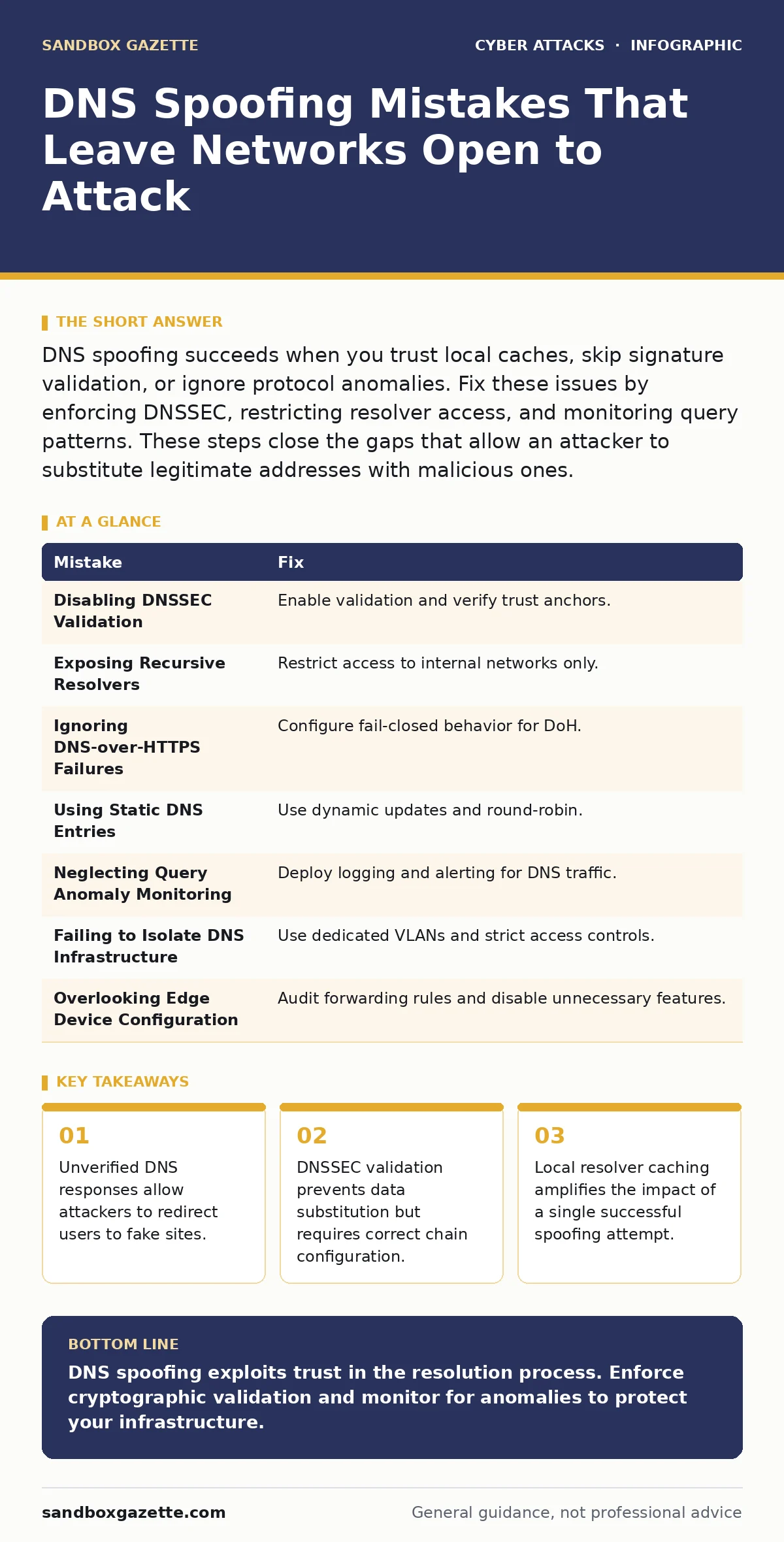
| Mistake | Fix |
|---|---|
| Disabling DNSSEC Validation | Enable validation and verify trust anchors. |
| Exposing Recursive Resolvers | Restrict access to internal networks only. |
| Ignoring DNS-over-HTTPS Failures | Configure fail-closed behavior for DoH. |
| Using Static DNS Entries | Use dynamic updates and round-robin. |
| Neglecting Query Anomaly Monitoring | Deploy logging and alerting for DNS traffic. |
| Failing to Isolate DNS Infrastructure | Use dedicated VLANs and strict access controls. |
| Overlooking Edge Device Configuration | Audit forwarding rules and disable unnecessary features. |
Key takeaways
- Unverified DNS responses allow attackers to redirect users to fake sites.
- DNSSEC validation prevents data substitution but requires correct chain configuration.
- Local resolver caching amplifies the impact of a single successful spoofing attempt.
DNS spoofing exploits trust in the resolution process. Enforce cryptographic validation and monitor for anomalies to protect your infrastructure.
Frequently asked questions
Does using a password manager prevent DNS spoofing?
No, a password manager stores credentials but does not validate the destination server. You can enter credentials into a spoofed site if DNS resolution fails.
How do login alerts help with DNS spoofing?
Login alerts notify you of access attempts, but they do not prevent the initial connection to a spoofed site. They help detect the aftermath of a successful attack.
Can secure email gateways stop DNS spoofing?
Secure email gateways filter malicious emails but do not protect against DNS resolution errors. They cannot stop a user from visiting a spoofed website.
Are MFA fatigue attacks related to DNS spoofing?
Both attacks aim to bypass authentication. DNS spoofing redirects users to fake login pages, while MFA fatigue overwhelms users with prompts. They can be combined in sophisticated attacks.
How this guide was produced: written by the Sandbox Gazette editorial team with AI assistance, checked against the public references listed below, and reviewed when the facts change. See our editorial policy or report an error.