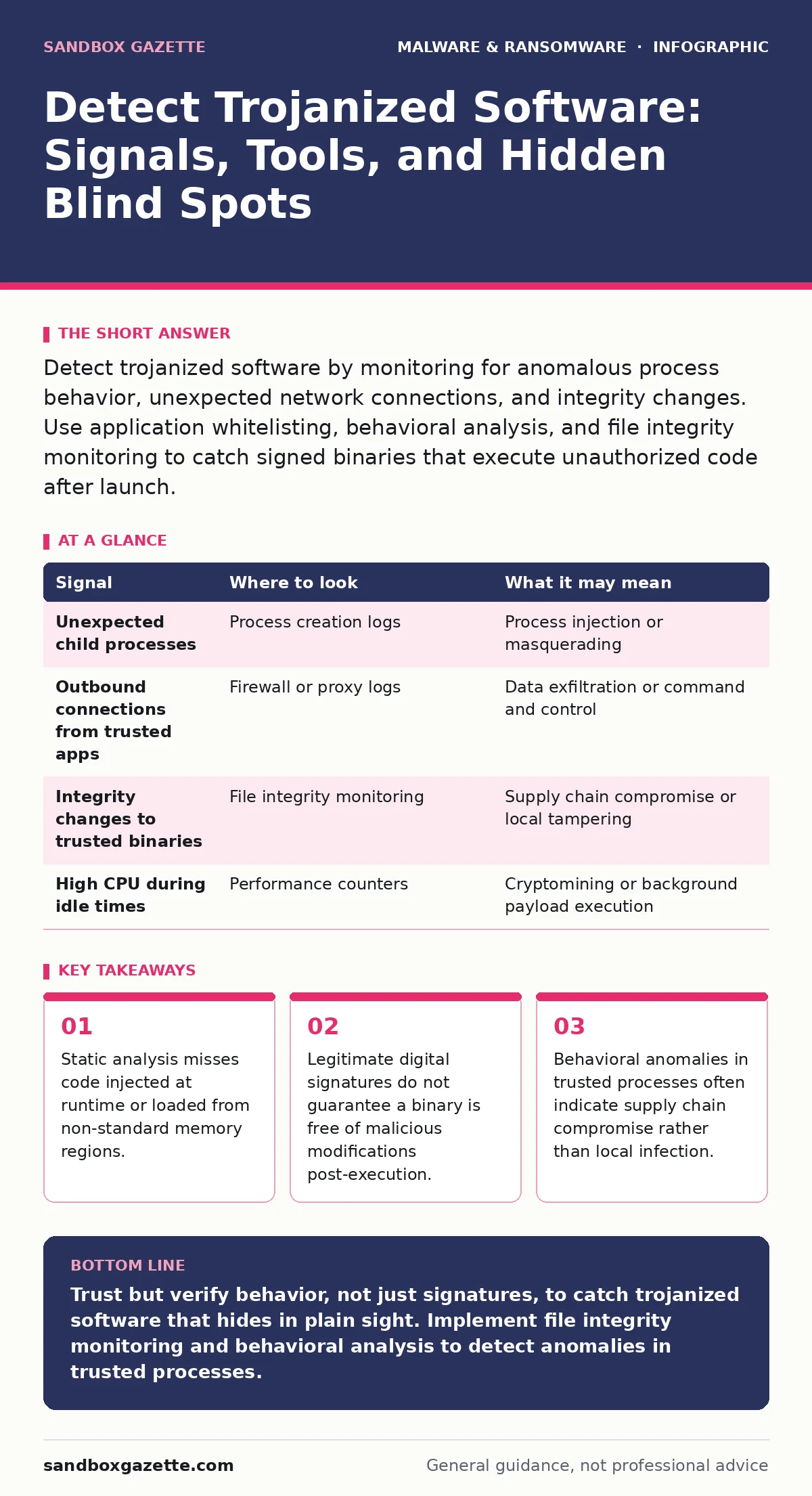
Detect trojanized software by monitoring for anomalous process behavior, unexpected network connections, and integrity changes. Use application whitelisting, behavioral analysis, and file integrity monitoring to catch signed binaries that execute unauthorized code after launch.
The Signature Fallacy
You trust a file because it carries a valid digital signature from a known vendor. That signature proves the file came from that vendor, not that it is safe. Attackers increasingly target the software supply chain, inserting malicious code before the binary is signed or modifying it in memory after execution begins. This creates a trojanized binary that looks legitimate to static scanners.
Static analysis checks the file on disk. It compares the file’s hash against known databases. If the file is new or modified slightly, the hash changes. However, if the attacker injects code only when the program runs, the file on disk remains clean. This technique is known as fileless malware or memory injection. Your antivirus engine sees a pristine file and allows it to run.
Process Injection and Masquerading
Once the trojanized software executes, it often does not behave like the application users expect. A common tactic is process injection. The malicious code forces itself into the memory space of a trusted system process, such as a browser helper or a system service. This hides the malicious activity under the guise of a legitimate process ID.
Look for processes that spawn children they never normally create. For example, a web browser should not launch a command shell. A text editor should not initiate outbound network connections to unknown IP addresses. These are behavioral outliers. They indicate that the process has been hijacked.
| Signal | Where to look | What it may mean |
|---|---|---|
| Unexpected child processes | Process creation logs | Process injection or masquerading |
| Outbound connections from trusted apps | Firewall or proxy logs | Data exfiltration or command and control |
| Integrity changes to trusted binaries | File integrity monitoring | Supply chain compromise or local tampering |
| High CPU during idle times | Performance counters | Cryptomining or background payload execution |
Network Anomalies and C2 Traffic
Trojanized software needs to communicate with its controller. This command and control channel often masquerades as normal traffic. The malware may use standard HTTPS ports to blend in with regular web browsing. It might use DNS queries to exfiltrate data, a technique called DNS tunneling.
You cannot rely on port numbers alone. Port 443 is used for legitimate web traffic and malicious command and control. You must inspect the content or the pattern. Look for beaconing. This is when a system contacts an external server at regular, rigid intervals. Legitimate software updates usually happen on a schedule, but they do not ping a single IP address every sixty seconds with identical packet sizes.
File Integrity Monitoring
File integrity monitoring tools track changes to critical system files and application binaries. They alert you when a file’s hash changes. This is effective against simple modifications. However, sophisticated attackers use packing or encryption to hide the malicious payload within the binary. The file changes, but the change looks like a legitimate update or compression.
Combine integrity monitoring with baseline behavior. If a file changes and then immediately exhibits unusual network activity, the risk is high. Do not ignore changes to configuration files or scripts that accompany binary updates. Attackers often modify scripts to redirect execution to a malicious payload while leaving the main binary untouched.
The Blind Spot of Signed Binaries
Your biggest blind spot is the assumption that a signed binary is safe. This is a cognitive shortcut that attackers exploit. Many security tools stop inspecting a file once they verify the signature. This is a critical failure point. The signature verifies the origin, not the current state or behavior.
Imagine a scenario where a vendor’s build server is compromised. The attacker inserts a backdoor into the installer. The vendor signs the installer. The backdoor is now "legitimate" in the eyes of your security stack. You must treat signed binaries with the same suspicion as unsigned ones. Apply application control policies that restrict what these binaries can do, not just whether they are allowed to run.
See also: Isolating Infected Devices: 6 Common Errors That Spread Malware · Ransomware Incident Response: Define, Contain, and Recover Systems
Tools and Techniques for Detection
You need tools that look at behavior, not just files. Endpoint detection and response platforms record process trees, network connections, and registry changes. They allow you to hunt for anomalies after the fact. Sandboxing is another valuable technique. It runs the software in an isolated environment to observe its behavior without risking your production systems.
However, sandboxes have limitations. Modern malware can detect if it is running in a virtual environment. It may remain dormant if it senses a sandbox. To counter this, use diverse sandbox environments and randomize their settings. Do not rely on a single sandbox result. Combine sandbox findings with telemetry from your actual endpoints.
Operationalizing Detection
Integrate these signals into your existing workflows. Create alerts for process injection attempts by trusted applications. Set up rules to flag outbound connections from non-browser applications. Review these alerts regularly. False positives will occur, but tuning your rules is part of the process.
Refer to our guide on sandboxing for details on configuring isolated execution environments. For broader protection strategies, see software restriction policies to limit executable paths. If you suspect a compromise, follow our ransomware incident response procedures to contain the threat. Understanding logic bombs helps you anticipate delayed attacks that may trigger after a specific condition is met.
Continuous Verification
Security is not a one-time check. Attackers evolve their techniques to bypass static defenses. You must continuously verify the behavior of your software. Regularly review process baselines for critical applications. Update your file integrity monitoring baselines after legitimate updates.
Do not neglect your supply chain. Verify the integrity of software from vendors before installation. Check for known vulnerabilities in the software you use. Patching is a defense against exploitation, but it does not remove existing trojans. You must actively hunt for signs of compromise in your environment.
Key takeaways
- Static analysis misses code injected at runtime or loaded from non-standard memory regions.
- Legitimate digital signatures do not guarantee a binary is free of malicious modifications post-execution.
- Behavioral anomalies in trusted processes often indicate supply chain compromise rather than local infection.
Trust but verify behavior, not just signatures, to catch trojanized software that hides in plain sight. Implement file integrity monitoring and behavioral analysis to detect anomalies in trusted processes.
Frequently asked questions
Can antivirus software detect trojanized binaries?
Traditional antivirus relies on signatures and may miss trojanized software if the malicious code is injected at runtime or if the binary is signed. Behavioral analysis is required for detection.
What is the difference between a trojan and trojanized software?
A trojan is a distinct malicious file disguised as legitimate. Trojanized software is a legitimate application that has been modified or infected with malicious code, often retaining its original signature.
How do I handle a suspected trojanized application?
Isolate the affected system from the network. Preserve evidence for forensic analysis. Check other systems for similar indicators of compromise. Consult our **ransomware incident response** guide for containment steps.
Are open-source tools safe from trojanization?
Open-source software is not immune. Attackers can compromise build systems or insert malicious code into repositories. Verify checksums and monitor for unexpected behavior regardless of the source.
How this guide was produced: written by the Sandbox Gazette editorial team with AI assistance, checked against the public references listed below, and reviewed when the facts change. See our editorial policy or report an error.